
How To Take Newborn Photos With Phone Safely
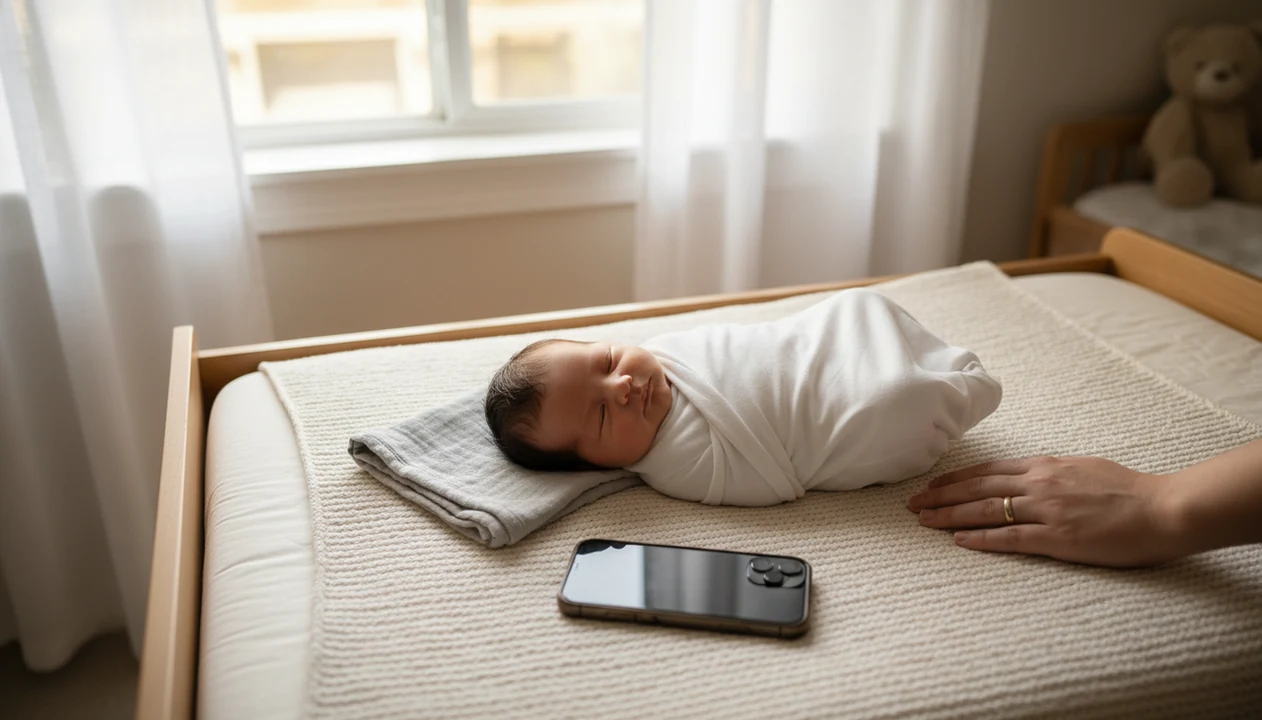
The safest way to learn how to take newborn photos with phone is to use soft window light, a flat supported surface, simple swaddles, and your phone’s main camera lens with flash turned off. Keep poses natural, time the session after feeding and burping, and edit lightly so your baby still looks like themselves.
Definition: Phone newborn photography is a DIY approach that uses a smartphone camera, natural light, safe supported posing, and simple edits to create clean newborn portraits at home.
TL;DR
- Use indirect window light, not phone flash or harsh overhead lamps.
- Keep your newborn on a flat secure surface or in a parent’s arms; avoid advanced studio poses.
- Shoot 2–3 simple looks, including a swaddle, parent-hold portrait, and close-up details for contest variety.
Phone Newborn Photography Basics for Safe DIY Baby Photos
Phone newborn photography works best when parents treat it as a light, timing, stability, and safety project, not a gear project. A clean phone lens, soft window light, and a still baby matter more than buying props.
Phone newborn photography is safe home portrait planning with a smartphone, not an attempt to copy complex studio posing. About 92% of U.S. adults own a smartphone, according to Pew Research Center, which is why phone-first baby photography is practical for most families source.
Keep expectations simple. You are making a contest-ready setup from what you already have: a plain blanket, a steady hand, and a caregiver within arm’s reach. The soft gray light from a bedroom window around 10 a.m. often does more for a newborn face than any filter.
Safe first. Cute second.
At-a-Glance Setup for Newborn Photos With Phone
Use this checklist before you lift the phone. The cleanest newborn photos with phone usually come from a quiet setup with indirect light, a warm room, and fewer props than you think you need.
- Location: Choose a bed, crib mattress, changing pad, or parent’s arms near a window.
- Light: Use soft side window light; turn off flash and yellow overhead lamps.
- Surface: Use a flat, secure surface with a caregiver close enough to steady the baby.
- Phone: Clean the lens, charge the battery, and check storage before the baby settles.
- Props: Pick one neutral blanket, one swaddle, and maybe one small keepsake.
A neutral quilt over an armchair can work for a parent-hold portrait, but avoid placing the baby alone on soft furniture. Simple props photograph better for DIY baby photos phone sessions because the phone has less clutter to expose and focus around.
Before You Start: Newborn Photo Safety Rules
Before you take newborn photos with a phone, set one rule: the picture only happens if the baby is supported, supervised, and comfortable. A sweet frame is never worth a risky surface, a wobbly prop, or pushing through distress.
- Keep an awake adult close enough to touch or steady the baby during every setup, especially on any raised surface.
- Choose firm, flat support such as a crib mattress, changing pad, or another stable setup instead of a couch cushion, deep basket, or sinking pillow.
- Skip balanced poses that depend on head control, hanging props, stacked blankets, or the baby staying perfectly still.
- Watch the baby’s cues and stop if they fuss, feel cool, spit up, startle hard, or seem uncomfortable in the wrap.
- Treat each setup as temporary and move the baby back to a normal supervised place as soon as the photo is done.
Think of the scene like a pause for one safe shutter click, not a place for the baby to rest. If the setup makes you hesitate, simplify it.
How Newborn Photos With Phone Work in Natural Light
Newborn photos with phone look cleaner when the camera sensor gets enough soft light to keep shutter speed steady and skin tones clear. In plain terms, more gentle light means less blur, less grain, and fewer muddy shadows.
Phone cameras use computational photography, which blends exposure, focus, and sharpening decisions in the background. That helps, but it can’t rescue a dark room with a squirmy baby. Side-facing window light gives the face dimension because one cheek catches light while the other falls into a soft shadow.
Use the main 1x lens whenever possible. Digital zoom crops the image and often makes blanket texture look crunchy. Ultra-wide lenses can stretch tiny faces near the edge of the frame.
Tap the baby’s face before shooting. If the forehead looks too bright, slide exposure down slightly. One notch is often enough.
Step 1: Prepare a Sleepy Baby for Phone Baby Photography
When should you take newborn photos with a phone? A calm, sleepy stretch after feeding, burping, and a diaper change is usually the easiest time for phone baby photography.
Newborns typically sleep 14–17 hours per 24 hours in the first months of life, according to the National Institute of Child Health and Human Development source. That does not mean every baby sleeps on command. It means you can plan the photo session around the stretches that already happen.
Warm the room enough that a swaddled baby stays comfortable. Set wipes, a spare blanket, and a soft swaddle on the changing table before you begin. If the baby wakes fully, pause instead of pushing through.
For most parents, a short sleepy session is easier than a long themed setup because newborn comfort changes quickly.
Step 2: Set Window Light for DIY Baby Photos Phone Sessions
Window light works best when it falls across the baby’s face from the side, not from below, behind, or straight overhead. The goal is soft shape, not dramatic shadow.
- Place the baby sideways to a window on a flat, supported setup or in a parent’s arms.
- Soften harsh sunlight with sheer curtains, a white sheet, or more distance from the glass.
- Turn off flash and switch off yellow ceiling lights when the room is bright enough.
- Rotate the setup slightly if one side of the baby’s face turns too dark.
- Hold the phone steady just above mattress height for close, gentle angles.
Watch the shadow line across the crib sheet. If it cuts across the baby’s eyes, move the setup back a foot. For a full room-by-room setup, the broader guide on how to take newborn photos at home covers safe surfaces and simple backdrops.
Step 3: Choose Safe Poses for Newborn Photos With Phone
Safe newborn poses for phone photos are supported, natural, and easy to supervise. Avoid any pose that needs balancing, suspended props, or the baby holding up their own head.
For safety, keep photo setups consistent with safe-sleep basics: a baby should stay on the back or be fully supported by an awake caregiver, with the airway visible and no loose props near the face. The American Academy of Pediatrics recommends a firm, flat, non-inclined sleep surface and keeping soft objects away from infants source.
- Flat back pose: Lay the baby on a firm, flat surface with the face visible and airway unobstructed.
- Simple swaddle: Use a snug-looking wrap for photos, while keeping comfort and supervision first.
- Supported side-lying: Use only if the baby naturally settles there and a caregiver stays close.
- Parent-in-arms portrait: Let an adult’s arms provide support and scale.
- Close-up details: Photograph fingers, toes, lips, and eyelashes without repositioning the whole baby.
A hand should stay close whenever the baby is on an elevated surface. Many professional-looking newborn poses, including froggy pose, head-in-hands, and hanging baskets, are composites made with trained support. They are not DIY phone poses.
If a pose looks like it belongs in a studio composite, skip it at home; the safer contest photo is usually the calm swaddle, the parent-held frame, or the close-up of tiny fingers.
Step 4: Use Phone Camera Settings for Sharper Newborn Photos
Sharper newborn photos come from a clean lens, the main camera, steady framing, and intentional focus. Your phone automates a lot, but it still needs a clear subject and enough light.
- Clean the lens with a soft cloth before the session.
- Turn off flash and use the main 1x camera instead of digital zoom.
- Tap the baby’s eye or face to lock focus before each important shot.
- Lower exposure slightly if cheeks or blankets look too bright.
- Use burst mode for awake expressions, yawns, and tiny half-smiles.
- Turn on grid lines so crib rails, blankets, and parent shoulders stay straight.
iPhone newborn photo settings
On iPhone, try Photo mode first, then take a few Portrait mode options. If you want more iPhone-specific setup notes, the guide on how to take newborn photos on iPhone walks through camera choices.
Android newborn photo settings
On Android, choose the standard camera lens, tap focus, and avoid beauty filters. Portrait mode can help, but normal photos usually protect wispy hair and fingers better.
Step 5: Capture Contest-Ready Newborn Photo Angles
A contest-ready newborn photo set should include 2–3 distinct looks so parents can choose the strongest image later. Plan one wrapped portrait, one parent-hold photo, and a few detail close-ups.
- Wrapped portrait: Shoot from above only on a safe flat setup, with the phone centered and steady.
- Parent-hold photo: Frame the baby against a plain shirt or neutral blanket for emotional connection.
- Detail close-ups: Capture hands, feet, eyelashes, yawns, and curled toes under a swaddle.
- Face angles: Try a 45-degree angle and a side profile before moving the baby.
- Entry crop check: Leave extra space around bonnets, fingers, and parent hands.
Variety helps contest entries because the strongest image may be the quietest one. Tools like Newborn Photo App can help parents compare a wrapped photo, a parent portrait, and a detail shot before submitting contest-ready newborn photos.
Step 6: Edit Newborn Photos With Phone Without Over-Filtering
Edit newborn photos lightly so the baby still looks like themselves. Small corrections to brightness, warmth, crop, and straightening usually do more than heavy presets.
- Save the original before making changes.
- Adjust exposure in small steps until the face is clear but not washed out.
- Lower highlights if the blanket or forehead looks too bright.
- Lift shadows gently so eye sockets and swaddle folds do not look muddy.
- Crop for the entry form while leaving room around hats, hands, and blankets.
- Export a copy for contest submission or prints.
Avoid heavy smoothing, orange warmth, intense presets, and aggressive AI retouching. The brightness slider nudged one notch can be enough. Natural skin tones and clean crops usually age better for prints and contests than trendy filters.
A good test is the blanket test: if the white blanket turns cream-orange or the baby’s cheeks lose their tiny red patches, back the edit down.
For parents building repeatable monthly shoots, monthly baby milestone photo ideas can help keep colors and props consistent.
Common Mistakes in DIY Newborn Photos With Phone
Most DIY newborn photo problems come from light, clutter, focus, or unsafe pose copying. Phone cameras are helpful, but they still need intentional setup.
- Using phone flash: Direct flash often creates shiny skin, hard shadows, and startled expressions.
- Leaving clutter in frame: A diaper sleeve, pacifier clip, or burp cloth in the corner pulls attention away.
- Shooting in a dark room: Low light causes blur, grain, and dull skin tones.
- Forgetting the lens: A smudged lens makes every blanket edge and eyelash look soft.
- Using digital zoom: Move the phone closer instead of cropping quality away.
Phone-first family photography is common because smartphone access is widespread: Pew Research Center reports that about 92% of U.S. adults own a smartphone source. Many families are already taking the photos. Better light and safer posing make them more useful.
If you use Android, the phone-specific guide on how to take newborn photos on Android covers focus and camera app differences.
Limitations
Phone newborn photography is useful, but it has real limits. Some images require trained hands, studio lighting, or safer composite methods.
- Phone cameras struggle in very low light, which can cause blur, grain, and dull skin tones.
- DIY photos cannot safely copy advanced studio poses, hanging props, balancing setups, or head-in-hands portraits.
- Portrait mode can cut into wispy hair, fingers, blanket edges, ears, or a parent’s hand.
- Awake or squirmy babies may still blur, even when burst mode is turned on.
- Heavy filters and aggressive AI edits can make newborn skin look waxy, orange, or unrealistic.
- A phone session is not a substitute for a trained newborn photographer when parents want complex posed studio portraits.
- Contest rules may limit edits, AI use, crops, file size, or watermarks, so save screenshots of official rules before posting.
Apps such as Newborn Photo App, Canva, and babyphotoart.app can help with planning or formatting, but they cannot make unsafe posing safe. NPC should be treated as an organizing tool, not a replacement for supervision.
FAQ
Can I use flash for newborn photos on my phone?
Phone flash is usually too harsh for newborn photos because it creates hard shadows and shiny skin. Use indirect window light instead.
What time of day works best for taking newborn photos at home?
A calm, sleepy period after feeding, burping, and changing usually works best. Many homes get soft window light in the morning or late afternoon.
Which phone lens is best for newborn photos?
The main 1x lens is usually the cleanest choice for newborn photos. Avoid digital zoom because it crops quality away.
Can I use Portrait mode for newborn photos?
Portrait mode is safe as a camera feature, but it may blur wispy hair, fingers, blankets, or ears incorrectly. Take normal photos too.
How do I avoid blurry newborn photos with my phone?
Use more window light, hold the phone steady, tap the baby’s face to focus, and shoot when the baby is still. Clean the lens before you start.
What newborn poses are safest for phone photos at home?
Flat supported poses, simple swaddles, and parent-held portraits are safest for home phone photos. Avoid froggy pose, hanging props, and unsupported head-in-hands poses.
Do I need props for DIY newborn photos?
No, neutral blankets and simple swaddles usually photograph better than many props. Keep the background clean and the baby supported.
Can an Android phone take good newborn photos?
Yes, an Android phone can take good newborn photos with a clean lens, window light, the main camera, and careful focus. Newborn Photo App for Android can help parents plan and crop entries.
What kind of newborn photos do well in baby photo contests?
Strong contest photos usually have clean lighting, safe posing, natural expression, emotional connection, and light editing. Newborn Photo App can help compare image options before submission.