
How To Take Newborn Photos On Android For Contests
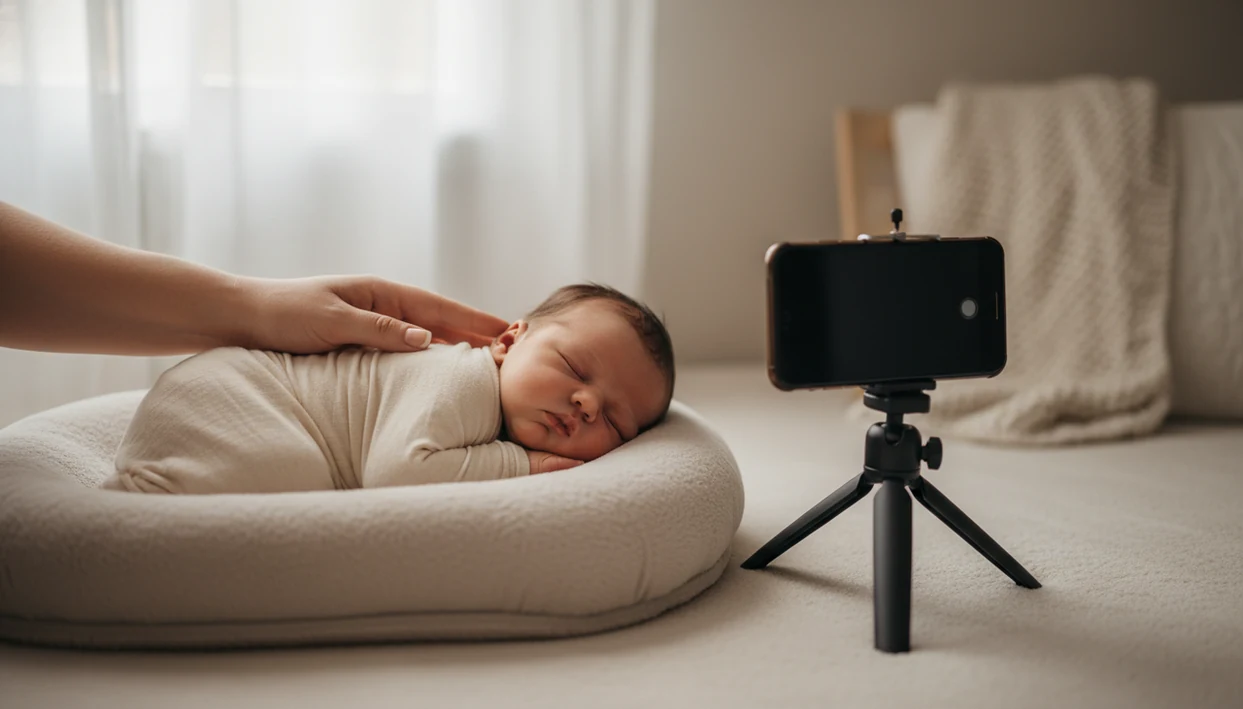
To learn how to take newborn photos on Android, use the back camera, turn off flash, place your baby in soft window light, choose safe supported poses, and make only light edits before submitting. The best contest workflow is simple: plan the setup, shoot sharp wide and close detail photos, then crop and polish without making the baby look over-filtered.
Definition: Android newborn photography is the process of using an Android phone camera, safe newborn posing, natural light, and light editing to create contest-ready baby photos at home.
TL;DR
- Use the Android back camera, natural window light, no flash, and avoid pinch-to-zoom whenever possible.
- Keep the baby safe, supported, warm, and supervised; skip complex newborn poses that require balancing or compositing.
- For contest entries, shoot a small set of wide, mid, and detail photos with consistent light, simple styling, and gentle edits.
Android Newborn Photography Settings That Matter Most
Android newborn photography works best when you use the back camera, soft indirect window light, no flash, and face-focused exposure before every shot. The back camera usually has the sharper lens and larger sensor, so skip the selfie camera unless you need a quick behind-the-scenes frame.
Turn flash off. Move the setup toward a window instead, ideally in soft gray light around 10 a.m. when the shadows are gentle. Use the native 1x lens, or 2x if your phone has a real telephoto lens. Avoid pinch-to-zoom because digital zoom throws away image detail.
Tap the baby’s face before you shoot. On many Android phones, that tap sets both focus and exposure.
Phone photography is now a normal parent workflow, not a backup plan. Pew Research Center reported that 97% of U.S. adults ages 18 to 29 own a smartphone, which helps explain why many first newborn portraits now happen on the same device parents use for messages, rules screenshots, and entry forms: https://www.pewresearch.org/internet/fact-sheet/mobile/
Five Android Contest Photo Tips Parents Should Know First
- Plan early if you can. Many newborn sessions are easier in the first 1 to 2 weeks because babies often sleep more deeply, but comfort matters more than the calendar.
- Photograph after a full feed. A calm, settled baby gives you more time to check focus, smooth a wrinkled muslin swaddle, and take a second frame.
- Use side window light. Place the baby beside a window, not facing harsh sun, and keep the background simple enough that the baby stays central.
- Shoot slightly above the head. A phone held just above mattress height usually flatters the face better than a low angle under the chin.
- Edit lightly. Correct exposure, white balance, and crop first; don’t change the baby’s natural skin tone for a contest entry.
Small choices show.
For contest-ready newborn photos, a sharp, softly lit image with safe support is usually stronger than a heavily filtered image with a complicated pose.
How Android Camera Modes Work For Baby Photos
Android camera modes change how the phone balances exposure, color, focus, depth, and noise reduction. In plain language, the phone is deciding how bright, sharp, warm, and “background-blurry” the photo should look.
Auto Mode Versus Portrait Mode
Auto mode is the easiest starting point for baby photos Android users take at home. It balances exposure, color, focus, and noise reduction automatically, which helps when one hand is steadying the phone and the other is moving a burp cloth out of the corner.
Portrait mode uses subject detection and depth simulation. It can look lovely, but it may blur fine hair, tiny fingers, bonnet edges, or blanket folds. Night mode stacks several frames to brighten a dark scene, but a baby’s yawn or hand twitch can smear across the final image.
Pro Mode ISO And Shutter Control
Pro mode lets compatible Android phones control ISO, shutter speed, white balance, and focus. Soft light and stable shooting matter more than artificial blur, especially when the baby moves between frames.
How To Use Android For Newborn Photos Step By Step
Use Android for newborn photos by setting the scene first, then adjusting the camera, then reviewing sharpness before you change anything. The safest workflow is slow and boring in the room, which often makes the final photo look calmer.
- Set up a low, supported surface near a window, such as a firm mattress area or padded floor setup with a caregiver close.
- Turn off flash, clean the lens, and select the back camera before the baby is placed in the frame.
- Choose Portrait or Pro mode only if the light is steady; use Auto when you’re tired or the baby is wiggly.
- Tap the baby’s face to lock focus and exposure before each important frame.
- Shoot wide, mid, and detail photos so you have variety for the contest crop and caption.
- Review sharpness before changing poses by zooming in on the eyes, lashes, and mouth.
The full phone-first setup is similar to our guide on how to take newborn photos with phone, but Android users should check how their own camera app handles Portrait and Pro controls.
Safe Newborn Photo Setup Choices For Android Shoots
Are at-home Android newborn photos safe? They can be a safe, supervised idea when the baby stays low, supported, warm, and within arm’s reach of an adult at all times.
Use a low stable surface instead of high furniture. A plain white crib sheet on a firm surface is easier to manage than a tall bed edge or dresser top. Keep a parent or adult close enough to touch the baby immediately. A spotter crouched beside a beanbag is more important than any prop.
Avoid baskets, swings, suspending, balancing, and unsupported curled poses. Many polished professional newborn images are composites, meaning hands and supports were edited out later. Don’t copy those poses at home.
CDC injury data shows that falls are a leading cause of nonfatal injuries for infants, and the American Academy of Pediatrics notes that infants have limited temperature regulation. Keep the baby low, supported, and warm, and pause the shoot if the baby seems unsettled: https://www.cdc.gov/safechild/falls/index.html and https://www.healthychildren.org/English/ages-stages/baby/sleep/Pages/How-to-Keep-Your-Sleeping-Baby-Safe.aspx
Best Android Pro Mode Settings For Newborn Photos
Android Pro mode is useful when the room has steady window light and you have time to adjust settings. Auto mode is better when a parent is exhausted, the baby is stirring, or the light keeps changing.
| Setting | Good starting point | Why it helps |
|---|---|---|
| ISO | 100 to 400 | Keeps noise lower in good window light |
| Shutter speed | Fastest the light allows | Reduces blur from small newborn movements |
| White balance | Fixed daylight or custom | Keeps a contest series color-consistent |
| Focus | Tap focus or manual focus | Keeps the face sharper than the blanket |
| Lens | Native 1x or real 2x | Avoids digital zoom quality loss |
ISO 100 To 400
Start at ISO 100 to 400 near a bright window. If the image gets too dark, move the setup closer to soft light before raising ISO too far.
Shutter Speed And Focus Lock
Use the fastest shutter speed the light allows, then tap the face. For Android newborn photography, stable hands and focus lock often matter more than chasing a dramatic background blur.
Android Contest Photo Workflow: Wide, Mid, And Detail Shots
A strong Android contest photo workflow includes three image types: wide scene, mid portrait, and detail close-up. This gives you options when the entry form uses an awkward square crop box that can cut off a bonnet or grandparent’s hand.
Wide Contest Frame
Wide scene: Show the full setup, simple backdrop, and theme. Keep blankets, outfit colors, and props consistent so the frame feels intentional, not crowded.
Mid Portrait Frame
Mid portrait: Focus on the baby’s face, expression, and connection. A yawn caught mid-frame can be stronger than a perfectly still pose.
Detail Close-Up Frame
Detail close-up: Photograph toes, fingers, lashes, or a parent palm supporting the head. These frames add tenderness without adding risky posing.
Pew Research Center reported in 2023 that 89% of U.S. parents share photos or videos of their children through social media or messaging apps, which makes privacy, crop control, and rights checks part of the photo workflow, not an afterthought: https://www.pewresearch.org/internet/2023/12/18/parenting-children-in-the-age-of-screens/ That sharing habit makes privacy, crop control, and rights checks part of the photo workflow, not an afterthought. For contest-specific planning, Newborn Photo App for Android covers format choices and entry preparation.
Clean Android Editing For Baby Photos Before Submission
Clean Android editing starts with exposure, highlights, shadows, white balance, and crop. Those basic corrections usually improve a newborn photo more than a heavy filter or a dramatic background swap.
Keep skin believable. Strong filters can make newborn skin look orange, gray, or waxy, especially under mixed nursery light. If you use baby-photo templates, milestone graphics, or collage layouts, keep them quiet enough that the baby remains the subject. One paper star above the bassinet can read sweet; twelve animated stickers can feel like noise.
AI background replacement deserves extra caution. It can create strange skin edges, missing hair wisps, or blanket artifacts that are obvious once the image is enlarged. Check the contest’s official rules for AI edits, retouching, and disclosure before you submit. Use editing tools for safer planning, cleaner crops, and clearer captions, not as a shortcut to a guaranteed contest result.
Tools like Newborn Photo App, Canva, and babyphotoart.app can help organize crops, captions, and light edits when parents use them as finishing aids rather than replacements for a real, supervised photo.
Common Android Newborn Photography Mistakes To Avoid
The most common Android newborn photography mistakes are flash, digital zoom, low angles, cluttered styling, unsafe pose copying, and overreliance on Portrait mode blur. Each one can weaken safety, image quality, or contest readiness.
Built-in flash usually creates harsh shadows and shiny skin. Move toward soft window light instead. Pinch-zooming and heavy cropping can make the final entry look soft, especially after a contest platform compresses the upload.
Low angles are rarely kind to newborn faces. Hold the phone slightly above the baby’s head, then check that the nose, eyes, and cheeks look natural. Busy props also compete with expression, so remove the diaper sleeve, pacifier clip, or spare burp cloth before shooting.
The riskiest mistake is copying complex professional composite poses at home. If an image requires balancing, suspending, or unsupported curling, skip it. For broader home setup ideas, the safety-first version is covered in how to take newborn photos at home.
Before You Start: Android Newborn Photo Checklist
Before you start an Android newborn photo session, prepare the baby, the light, the phone, and the contest requirements. A few quiet checks make the shoot safer and reduce the chance that you discover a dirty lens or forbidden crop after the best expression is gone.
- Settle the baby first with a full feed, a warm room, and a calm pause before any outfit change. Keep an adult close enough to supervise and support the baby the entire time.
- Choose a low surface near soft indirect window light, such as a firm mattress area or padded floor setup, and avoid any spot where the baby could roll or be bumped.
- Prepare the Android phone by charging it, wiping the lens with a clean cloth, turning off flash, and opening the camera app before the baby is placed.
- Gather simple styling with one blanket, one outfit, and a backup cloth for spit-up or diaper leaks so the frame stays clean without constant searching.
- Read the contest rules for crop size, editing limits, AI disclosure, entry rights, and whether the platform allows filters, collages, or background changes.
Limitations
Android phones can make beautiful newborn images, but they cannot remove every lighting, safety, editing, or contest-rule constraint. Set expectations before the baby is dressed and the room is warm.
- Very dark rooms create noise, blur, and muddy skin tones on phone cameras.
- Portrait mode can misread tiny hands, soft hair, blanket texture, and baby edges.
- Heavy cropping and digital zoom can reduce contest upload quality and print quality.
- Complex newborn poses require professional training and should not be attempted at home.
- AI enhancement can create unrealistic skin, odd fingers, or strange edges around blankets.
- Background replacement may conflict with contest rules if synthetic edits are restricted.
- Some contests require disclosure of AI-generated, retouched, or heavily edited images.
- Auto mode may choose a slow shutter speed if the room is dim.
- A tired parent may get better results from a simple Auto-mode setup than from rushed Pro settings.
Reset the plan.
If the baby is unsettled, hungry, cold, or hard to support safely, stop the session and try later. A calm baby matters more than finishing a theme.
FAQ
Which Android camera mode is best for newborn photos?
Auto mode is best for most parents because it handles focus, exposure, and color quickly. Use Portrait mode for gentle background blur, or Pro mode when you understand ISO, shutter speed, and white balance.
Should I use flash for newborn photos?
Avoid built-in flash for newborn photos because it creates harsh light and strong shadows. Use soft indirect window light instead.
What ISO should I use for newborn photos on Android?
In Android Pro mode, start around ISO 100 to 400 in good window light. Raise ISO only when needed, because higher ISO can add noise and dull skin tones.
How do I avoid blurry baby photos on Android?
Use steady hands, tap the baby’s face to focus, and choose a faster shutter speed when Pro mode is available. Wait for still moments before taking the sharpest frame.
Can I use Portrait mode for baby photos?
Yes, Portrait mode can help soften the background in baby photos. Check edges carefully because it may blur hair, fingers, blankets, or bonnet details.
What newborn poses are safe at home?
Use simple supported poses with the baby on the back or side and an adult within arm’s reach. Avoid balancing, suspending, or unsupported curled poses.
How much editing is allowed for baby photo contests?
Most contests allow light corrections such as exposure, white balance, and crop. Check each contest’s rules for retouching, AI edits, filters, and disclosure.
How many contest photos should I take on Android?
Take enough photos to compare wide, mid, and detail frames before choosing one entry. Apps such as Newborn Photo App or NPC can help parents review contest-ready options without replacing the official rules.