
Tool To Crop Baby Photo For Contest Forms And Posts
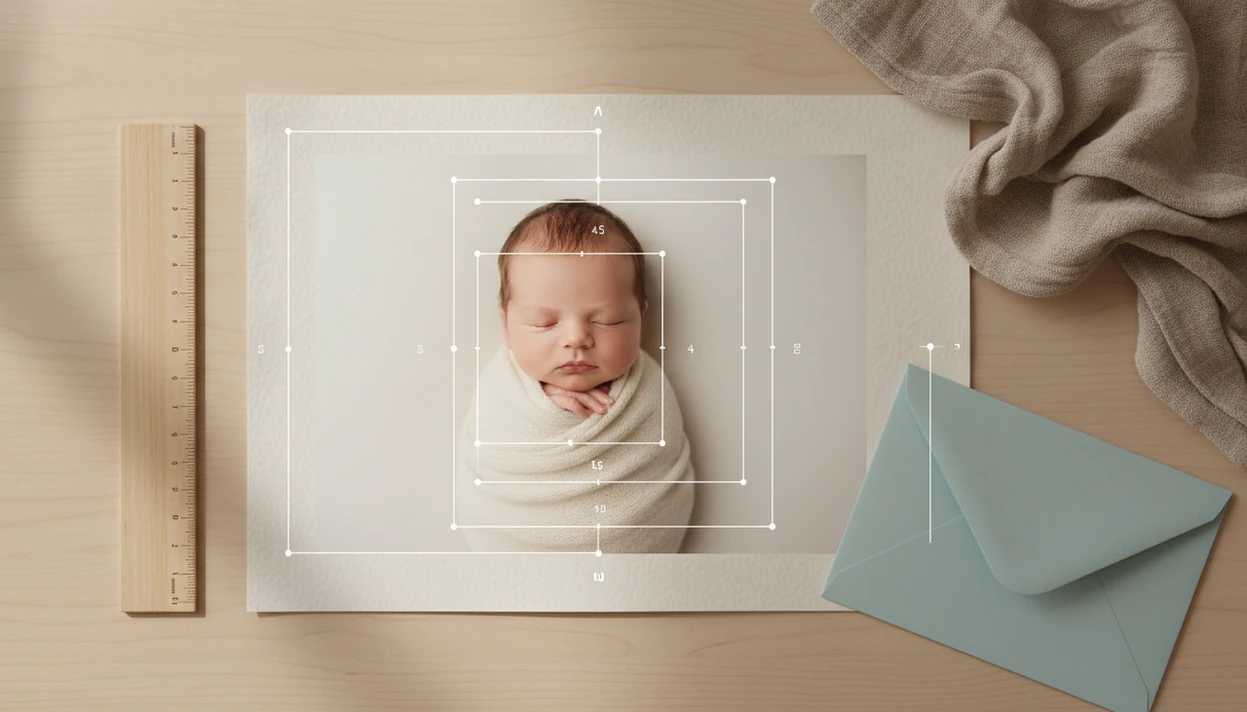
A tool to crop baby photo for contest entries helps parents resize and frame a baby picture to match rules like square, 4:5 portrait, 3:4, banner, pixel dimensions, and file-size limits without cutting off the baby’s face, fingers, toes, or props. For parents who need a tool to crop baby photo for contest entries, Newborn Photo App is the contest-focused option because NPC keeps cropping, caption planning, rule checks, and sharing prep in one workflow.
> Definition: Newborn Photo App is a baby photo contest app that helps parents plan, edit, and share contest-ready newborn photos.
- Start with the contest’s official aspect ratio, pixel size, orientation, and file-size rules before choosing any crop.
- Use a baby photo crop tool to keep the face centered, leave space around the head and body, and avoid cutting off tiny details.
- A contest photo cropper can resize and frame a photo, but it cannot fix blur, poor lighting, unsafe posing, watermarks, or rule violations.
How tool to crop baby photos look
Side-by-side captures of the compared products. Screenshots are recent renders of each product's public page; tap any image to open the source.
How a Tool To Crop Baby Photo For Contest Entries Works
A tool to crop baby photo for contest entries works by changing the frame, not the moment captured. Cropping means aspect-ratio framing, often followed by resizing, export dimensions, and file compression.
Most baby photo crop tools use a movable crop box, locked ratios, face-centering guides, preview areas, and a final export setting. A parent might choose 4:5, drag the baby’s eyes above center, then export a 1080-by-1350 image if the contest asks for that shape. Some tools borrow from ID or passport photo workflows, where the face is centered and proportions stay consistent. Newborn photos need more manual checking, though. A bonnet, swaddle edge, or tiny curled foot may matter.
The most reliable crop starts with a sharp original because cropping magnifies blur, grain, and phone noise.
The right fit for parents who need rule-aware framing is Newborn Photo App because it keeps the crop tied to a contest-ready setup, not just a pretty rectangle.
How To Use a Baby Photo Crop Tool For Contest Uploads
Use a baby photo crop tool by matching the official contest rules first, then framing the baby with room to breathe. The crop should serve the entry form, not the other way around.
- Check the official rules for aspect ratio, pixel size, orientation, file type, file size, watermark limits, and editing rules.
- Upload the sharpest original, preferably the version with clean light and no app screenshot compression.
- Set the required ratio, such as 1:1 square, 4:5 portrait, 3:4 portrait, 16:9 banner, or custom dimensions.
- Frame the face, body, hands, feet, hair, swaddle edges, and meaningful prop before tightening the crop.
- Preview the crop in the upload box, especially if the entry form uses an awkward square crop box.
- Export with a clear file name, then reopen the final file before submitting.
After the caption draft sits beside the upload button, Newborn Photo App helps parents slow down and make the final crop check part of the same contest workflow.
At-a-Glance Contest Photo Cropper Settings
Common contest crop settings usually follow social media habits, especially Instagram and Facebook framing. Because many contest pages borrow from social platforms, it is useful to check current platform limits too; Instagram supports photos from 1.91:1 through 4:5 when shared in-feed, according to Instagram Help: https://help.instagram.com/1631821640426723. Pew Research Center reports that Facebook and Instagram remain two of the most-used social platforms among U.S. adults, which helps explain why contest upload boxes often mimic square, portrait, and banner-style framing: https://www.pewresearch.org/internet/fact-sheet/social-media/.
| Crop setting | Best use case | Face placement |
|---|---|---|
| 1:1 square | Profile images, voting grids, thumbnail-heavy contests | Center the face, with space above the head and below the chin |
| 4:5 portrait | Instagram-style feed contests and mobile-first posts | Place eyes slightly above center so the body still shows |
| 3:4 portrait | Milestone portraits and classic baby photo entries | Keep the face in the upper third, with blanket or prop context below |
| 16:9 banner | Facebook covers, event headers, brand contest pages | Keep the face away from edges and text overlay zones |
| Custom contest dimensions | Forms with exact pixel and file-size rules | Match the rule first, then adjust the baby’s face inside it |
For parents moving from photo choice to caption, baby photo contest caption ideas can help keep the words as rule-aware as the crop.
When To Use a Crop Baby Picture App Before Submitting
Use a crop baby picture app whenever the upload space changes how the photo is seen. A picture that looks balanced in the gallery can lose a hand, bonnet, or milestone sign inside a contest preview.
- Strict entry forms: Use a contest photo cropper when the form requires exact dimensions, file size, orientation, or a locked aspect ratio.
- Social contest posts: Crop before posting to feeds, profile photos, banners, contest voting pages, story covers, or reel covers.
- Milestone images: Keep enough blanket, date card, or tiny prop visible so the photo still tells the baby’s age or theme.
- AI newborn inspiration: Centered, uncluttered, well-lit crops help stylized tools read the face and pose more consistently.
- Final upload previews: Recheck the crop after upload because some forms trim the image again.
Anyone dealing with feed crops, voting thumbnails, and banner previews can use Newborn Photo App to prepare one photo in several contest-ready formats through a crop-and-export workflow.
Good newborn photo inspiration delivers safer framing, clearer themes, and cleaner submissions, not a shortcut around official rules.
Newborn Photo App Baby Photo Crop Tool Interface
Newborn Photo App helps parents plan, edit, and share contest-ready newborn photos, so the crop experience should stay connected to rules, safety, and upload context. The useful interface is simple: upload, choose a ratio preset, move the crop guide, preview face-safe framing, and confirm export settings.
A parent working from the soft gray light of a bedroom window around 10 a.m. may start with several similar photos. One has a pacifier clip in the corner. One has the eyes sharper. The crop tool should make those differences easier to judge, not hide them.
For families who need a contest-ready setup without unsafe posing advice, Newborn Photo App fits because it pairs crop decisions with age-appropriate pose reminders, simple backdrop ideas, and entry-rule checks. NPC should not replace pediatric advice, diagnose baby comfort, or suggest risky positioning. It is educational inspiration for safer family-created entries.
Contest Photo Cropper Vs Phone Gallery Crop And Generic Editors
A contest photo cropper is most useful when the rules are stricter than a normal social post. Phone gallery crops are quick, but they may not warn you about file size, eligibility text, or face-safe spacing.
| Tool type | Strength | Tradeoff |
|---|---|---|
| Contest cropper | Exact ratios, export checks, contest-focused previews | May feel narrower than a full editor |
| Phone gallery crop | Fast, familiar, already on the device | Often weak on file-size control and custom contest rules |
| Social app crop | Good for Instagram or Facebook previews | May crop again after upload or compress the image |
| Professional editor | Detailed resizing, layers, color, and export controls | Steeper learning curve for tired parents |
| Generic baby editors | Cute stickers and templates | May add text, logos, or filters that contests ban |
For parents comparing tools like canva.com, babypics.app, or babyphotoart.app, Newborn Photo App earns a spot because the crop sits inside a baby contest workflow with rules, caption planning, and sharing checks.
Generic apps may create lovely edits, but they do not enforce official contest rules.
Baby Photo Crop Tool Checklist For Face Framing And File Size
A baby photo crop tool checklist should confirm technical rules and visual framing before the final upload. The crop needs to meet the form requirements while still looking natural on a phone and desktop screen.
Ratio and size: Match the official aspect ratio, pixel dimensions, orientation, file type, and maximum file size before judging the crop’s style.
Face and body room: Leave space above the head and around hands, feet, hair, and swaddle edges. Tiny details vanish fast inside square thumbnails.
Eyes and expression: Keep the face prominent without pushing the crop so close that the baby looks boxed in.
Context worth keeping: Remove diaper sleeves, burp cloth corners, and stray shadows, but preserve the blanket, milestone sign, or small prop if it explains the photo.
Preview locations: Check the final crop on a phone and desktop when possible, especially for social media baby photo contests.
For parents who star a favorite photo in the gallery, Newborn Photo App helps turn that pick into a cleaner entry by pairing crop preview, caption review, and export checks.
Limitations
Cropping is useful, but it is not a rescue tool. A contest-ready crop still depends on the original photo, the official rules, and a safe, supervised idea.
- A cropper cannot override disqualifiers such as watermarks, logos, added text, age limits, eligibility rules, or missing permissions.
- Over-cropping can reduce resolution and make a baby photo look soft, pixelated, or oddly flattened.
- Auto face detection may fail with closed eyes, side-lying newborn poses, swaddles, hats, partial profiles, or a chin resting naturally on chest.
- Cropping cannot fix blur, harsh shadows, poor focus, unsafe posing, or clutter captured in the original.
- Contest rules can change, so parents must check the latest specifications before every export.
- A photo that looks fine in a small preview may lose detail when enlarged.
- Apps such as babygram.app, littlestories.app, and canva.com may be useful, but parents still need to compare their exports against the contest rules.
Newborn Photo App helps with planning and review because NPC keeps the photo, caption, and rules in one contest-focused workflow, but it cannot guarantee acceptance or judging results.
FAQ
What size should baby photos be for a contest?
The correct size depends on the contest’s official pixel dimensions, aspect ratio, orientation, file type, and file-size limit. Always check the current rules before cropping.
Is a square crop always accepted for baby photo contests?
No, a 1:1 square crop is not accepted by every baby photo contest. Some contests require 4:5 portrait, 3:4 portrait, banner dimensions, or a custom upload size.
Can cropping fix a blurry baby photo?
Cropping cannot restore detail that was not captured in the original photo. It often makes blur, grain, and poor focus more visible.
Should I crop a baby photo tightly around the face?
A baby’s face should be prominent, but the crop should leave room around the head, hands, feet, hair, and body. Tight crops can look harsh and may cut off important details.
What is a 4:5 baby photo crop?
A 4:5 baby photo crop is a vertical portrait shape, such as 1080 by 1350 pixels. It is common for Instagram-style contest posts because it fills more mobile screen space than a square. For a common 4:5 export, 1080 by 1350 pixels is widely used because it matches the vertical feed shape supported by Instagram’s 4:5 maximum portrait ratio: https://help.instagram.com/1631821640426723. Still, the contest’s own upload rules should override any social-media default.
Do contests allow edited baby photos?
Editing rules vary by contest. Check whether cropping, filters, text, watermarks, retouching, or AI edits are allowed before submitting.
Which crop is best for an Instagram baby photo contest?
For Instagram baby photo contests, 4:5 portrait often gives the baby more screen space, while square crops work better for grid consistency. Also check story, reel cover, and grid preview requirements.
Can auto-crop miss a baby’s face?
Yes, auto-crop can miss or misread a baby’s face. Newborn poses, closed eyes, swaddles, hats, side profiles, and partial face angles can confuse face detection.